
Purpose: Learn how to enable pick-up returns via the return portal so you can arrange to have a carrier collect a return parcel directly from your customer.
Related articles
→ How do I set up my return portal?
What are pick-up returns?
A pick-up return is a return method you can offer to your customers through the Return portal. Once enabled, customers will be able to request a carrier collect a parcel directly from their address to return to you. Your customers can easily arrange a pick-up themselves via the Return portal.
The pick-up return feature allows you to go the extra mile for your customers who can't easily access a parcel shop, or for parcels which are too large to return easily. Your customer doesn't even need to print out the return label - the driver who collects the return parcel will label it on their behalf.
Which carriers support pick-up returns?
Netherlands/Belgium
GLS NL (direct contract only)
Once a pick-up is arranged, the scheduled collection will take place the next working day between 9:00-17:00 for locations in the Netherlands**. Your customers will receive an email confirmation automatically from the Return portal confirming their pick-up.
**If the return is announced after 17:00, the pick-up will be scheduled two working days later. E.g., if you announce a pick-up return at 5:10 pm on a Wednesday, the pick-up date will be Friday instead of Thursday.
Available shipping methods:
-
GLS BusinessParcel Return Pick Up 0-32kg
- GLS EuroBusinessParcel Return Pick Up 0-32kg
DHL Express NL (direct contract only)
Once a pick-up is arranged, the scheduled collection will take place the next working day between 9:00-17:00 for locations in the Netherlands**. Your customers will receive an email confirmation automatically from the Return portal confirming their pick-up.
**If the return is announced after 17:00, the pick-up will be scheduled two working days later. E.g., if you announce a pick-up return at 5:10 pm on a Wednesday, the pick-up date will be Friday instead of Thursday.
Available shipping methods:
- DHL Express Worldwide Return Pick-up
UPS
Once a pickup has been arranged, it will take place on the next business day. This usually happens at the end of the day, but there are no fixed pickup times available. Pickups are only possible on weekdays.
Requests for outbound shipments can be cancelled up to 28 days after the initial processing. Return shipments can be cancelled until 02:00 AM Eastern Time the following night.
There is no fixed pickup time, but please note that the shipment must be collected at some point on the next business day, so ensure sufficient processing time.
Available shipping methods:
UPS Standard Return - 1 Pickup Attempt
UPS Express Saver Return 0–70 kg
Belgium
UPS
Once a pickup has been arranged, it will take place on the next business day. This usually happens at the end of the day, but there are no fixed pickup times available. Pickups are only possible on weekdays.
Requests for outbound shipments can be cancelled up to 28 days after the initial processing. Return shipments can be cancelled until 02:00 AM Eastern Time the following night.
There is no fixed pickup time, but please note that the shipment must be collected at some point on the next business day, so ensure sufficient processing time.
Available shipping methods:
UPS Standard Return - 1 Pickup Attempt
UPS Express Saver Return 0–70 kg
DHL Express
United Kingdom
Evri dropoff (UK)
Once a pick-up is arranged, the scheduled collection will take place the next working day between 9:00-19:00. pick-up only possible on weekdays. It's not possible to cancel a pick-up via the Sendcloud panel - create a support request if you wish to cancel a pick-up.
Cut-off time: 23:59 UK time
Available shipping methods:
- Evri dropoff Collection Return Standard Delivery (0-1kg; 1-2kg; 2-5kg; 5-10kg; 10-15kg)
UPS
Once a pick-up is arranged, the scheduled collection will take place the next working day. This usually takes place at the end of the day, but no fixed collection windows are available as yet. pick-up only possible on weekdays.
Applications may void forward shipments up to 28 days after initially processing them. Return shipments can be voided until 2 a.m. Eastern Time the following night.
No set cut-off time, but please keep in mind when the pick-up must take place and allow enough processing time.
Available shipping methods:
- UPS Standard Return - 1 Pickup Attempt
- UPS Express Saver Return 0-70kg
Spain
CTT express (Spain)
Arrange a pick-up in combination with a return. If a label is created with this return method, a pick-up will automatically be arranged for the next work day. The pick-up fees are not included in the pricing.
CTT Express works in 2 different shifts:
Morning shift: 10:00 - 14:00
Afternoon shift: 15:00 - 19:00
Available shipping methods:
- CTT Express Baleares Devolucion + Recogida 24h
- CTT Express Baleares Devolucion + Recogida 48h
- CTT Express Devolucion + Recogida 24h Peninsula Iberica
- CTT Express Devolucion + Recogida 48h Peninsula Iberica
SEUR v2 (Spain)
Once a pick-up is scheduled, the collection will take place the next working day between 9.00 and 18.00. Collections are possible from Monday to Friday (excl. public holidays).
Cut-off time for next day pick-up: 17.00.
Available shipping methods:
- SEUR 24 Retorno + Recogida
- SEUR 48 Retorno + Recogida
Maximum weight: 30 kg
GLS ES
MRW
UPS
DHL Express
Deutschland
UPS
When a return label is created via UPS, a pick-up is generated automatically. The collection usually takes place on the next business day between 09:00 and 17:00, from Monday to Friday (excluding public holidays).
If the driver does not show up on the scheduled day, please contact Sendcloud Support immediately so we can follow up with UPS and arrange a new pick-up if needed.
Hermes
Pick-up returns via Hermes are only available through a direct carrier contract. For information about how to activate and manage pick-up returns, please contact your Hermes account manager.
DHL Express
Pick-up returns with DHL Express are also available only through a direct contract. Once the service is active, a pick-up is typically arranged automatically when the return label is created. Collections generally take place the next working day between 09:00 and 18:00. Customers will receive an email confirmation directly from DHL Express.
For more information or specific service conditions, please contact your DHL Express account manager.
Note:
UPS pick-up returns are available directly via Sendcloud. For Hermes and DHL Express, pick-up returns can only be used by users with their own direct carrier contracts.
Austria
UPS
DHL Express
France
Colissimo
UPS
DHL Express
Geodis
Italy
Poste Delivery Business (Italy)
The pick-up is booked automatically when announcing the label (no need to schedule it manually online or by phone). The collection will take place the next business day between 9:00-18:00. pick-ups are only possible from Monday to Friday (excl. public holidays).
After the label (pick-up return) is created via the return portal or via the manual return form, you will be able to download a PDF where it is stated that the pick-up has been successfully booked and that it is not necessary to print the label. The carrier will bring the label with them.
In case the first pick-up return attempt fails, please schedule an incidental pick-up via your Sendcloud account at the end customer's address. This is subject to regular pick-up fees.
Available shipping methods:
- Poste Delivery Business Standard Reverse Paperless pick-up
- Poste Delivery Business Express Reverse Paperless pick-up
DHL Express
Return pick-up is only available for Sendcloud Premium users. Once the return label is created, the pick-up will be scheduled automatically. The pick-up time is from 09:00 to 12:00 and from 14:00 to 17:00, Monday to Friday.
Available shipping method:
DHL Express Domestic Return Pick-up
GLS IT
Returns are only available via direct contract. The package is picked up at the customer's address and is automatically scheduled when the return label is created. The pick-up time is from 13:00 to 18:00, Monday to Friday.
Available shipping method:
GLS National Express Return - Pick&ReturnService 0-70kg
How can I enable pick-up returns in my account?
- In your Sendcloud account, go to Returns > Return portal
-
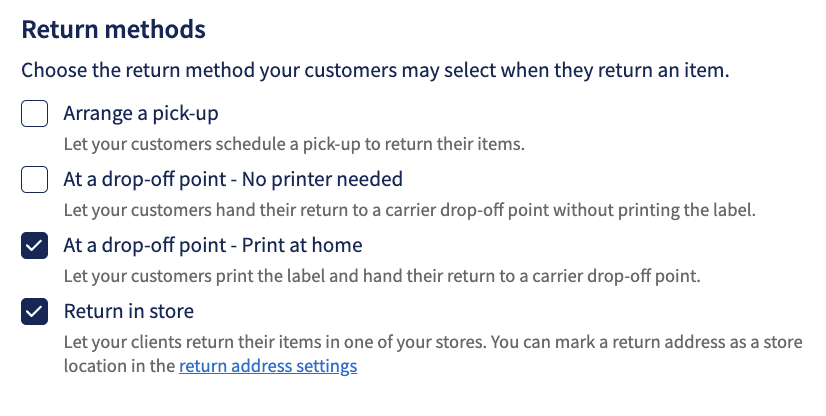
Under the section Return method, tick the box Arrange a pick-up
-
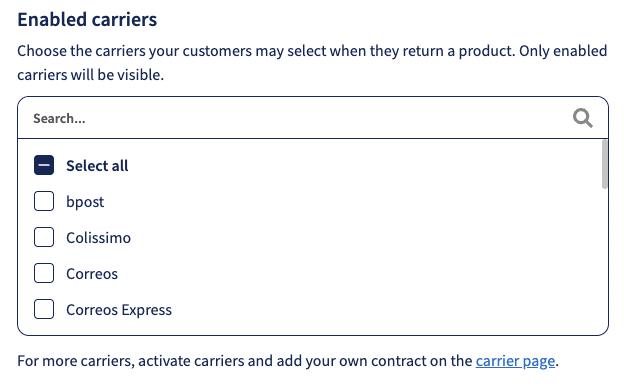
Scroll down to the section Enabled carriers and ensure you select a carrier which supports pick-up returns (GLS NL, DHL Express NL, CTT Express, SEUR, Evri dropoff, Poste Delivery Business, UPS)*
How can my customer request a pick-up return?
If you have already activated your Return portal, customers will be able to select pick-up return as a return option once they have entered their tracking number/order number and postcode and selected a return reason. You can find out more about how customers can make returns here.
-
In the Return portal, select Arrange a pick-up from the list of options in the section How would you like to return
- On the Summary page, click Confirm
- The customer will see a Success page and receive an email confirmation which will confirm the pick-up date (next working day).
- The pick-up will now be scheduled for collection the next working day (GLS NL, DHL Express NL) (if scheduled before 17:00) between 9:00-17:00 and returned to the sender's address. Once the pick-up is confirmed, a more accurate pick-up time will be communicated by the carrier by email to your customer.
- It's not necessary for your customer to print out the return shipping label when they schedule a return pick-up with GLS NL or CTT Express. The driver who will perform the pick-up will bring the return label and label the parcel when the collection takes place. When you ship with DHL Express NL, we advise putting the label in the box of the outgoing shipment or sending the client a PDF with a return label via email at a later time.
How can I cancel a pick-up return?
You must cancel the pick-up return before 5 pm on the same day as you book the return. The return will take place the following day; therefore, any cancellations received after this time will not be received by the carrier on time, and the pick-up return will still take place, and you will still be charged.
- In the Sendcloud panel, go to the Returns > Overview
- Locate your pick-up return in the list of return labels
- Select the return in the list and click the Cancel returns button:
FAQ
Can I cancel a pick-up?
If your customer wants to cancel a return, you can cancel it on their behalf provided you do so before 5 pm on the day of booking. This is because the pick-up will take place on the next working day from when it is scheduled. Once cancelled, you will receive an email from the carrier to schedule a new pick-up.
Can my customer cancel a pick-up?
Only you can cancel a pick-up, either through the Sendcloud panel or by contacting the carrier directly. This must be done before 5pm on the day you book the pick-up return.
Can I change the time of a pick-up once it's been scheduled?
Unfortunately not. You can only cancel a pick-up completely, and then book a new one for the correct time.
What happens if the customer is not home when the carrier arrives to complete the pick-up?
You will be charged for the failed pick-up. The customer will receive an email to make a new appointment. You will also be charged for any new pick-up the customer books.