
Purpose: Learn how to choose and activate carriers in Sendcloud, ship with Sendcloud's pre-negotiated rates or your own carrier contracts, and find important shipping requirements and potential surcharges before you start shipping.
Sendcloud lets you ship with multiple carriers, giving you the flexibility to choose the shipping methods and rates that best suit your business. You can use our pre-negotiated rates, connect your own carrier contracts, or combine both options.
Ship with Sendcloud rates
With Sendcloud rates, you can ship using our pre-negotiated carrier rates without arranging your own contract directly with the carrier.
Several carriers may already be enabled in your account by default. You can enable additional carriers or disable those you don't want to use at any time.
How to activate a carrier
- In your Sendcloud panel, go to Shipping > Carriers.
- Find the carrier you want to ship with in the carrier list.
- Under Sendcloud rates, click the toggle to enable the carrier. If Sendcloud rates are unavailable for that carrier, you'll see Not offered instead.
- When you enable a supported carrier, a window appears with important shipping tips and an overview of common surcharges. Review this information before you start shipping.

Once enabled, you can use the carrier's available shipping methods when creating shipments with Sendcloud rates. You can enable as many supported carriers as you need.
Check shipping tips and potential surcharges
Each carrier has its own shipping conditions. These can include parcel size and weight limits, packaging requirements, labeling guidelines, and other rules that affect how your shipments are processed.
To help you prepare your parcels correctly and avoid unexpected costs, Sendcloud displays important carrier information directly in your panel when you enable a supported carrier.
What will you see when enabling a carrier?
The Shipping with [carrier name] window provides an overview of the most important information to know before shipping with that carrier.
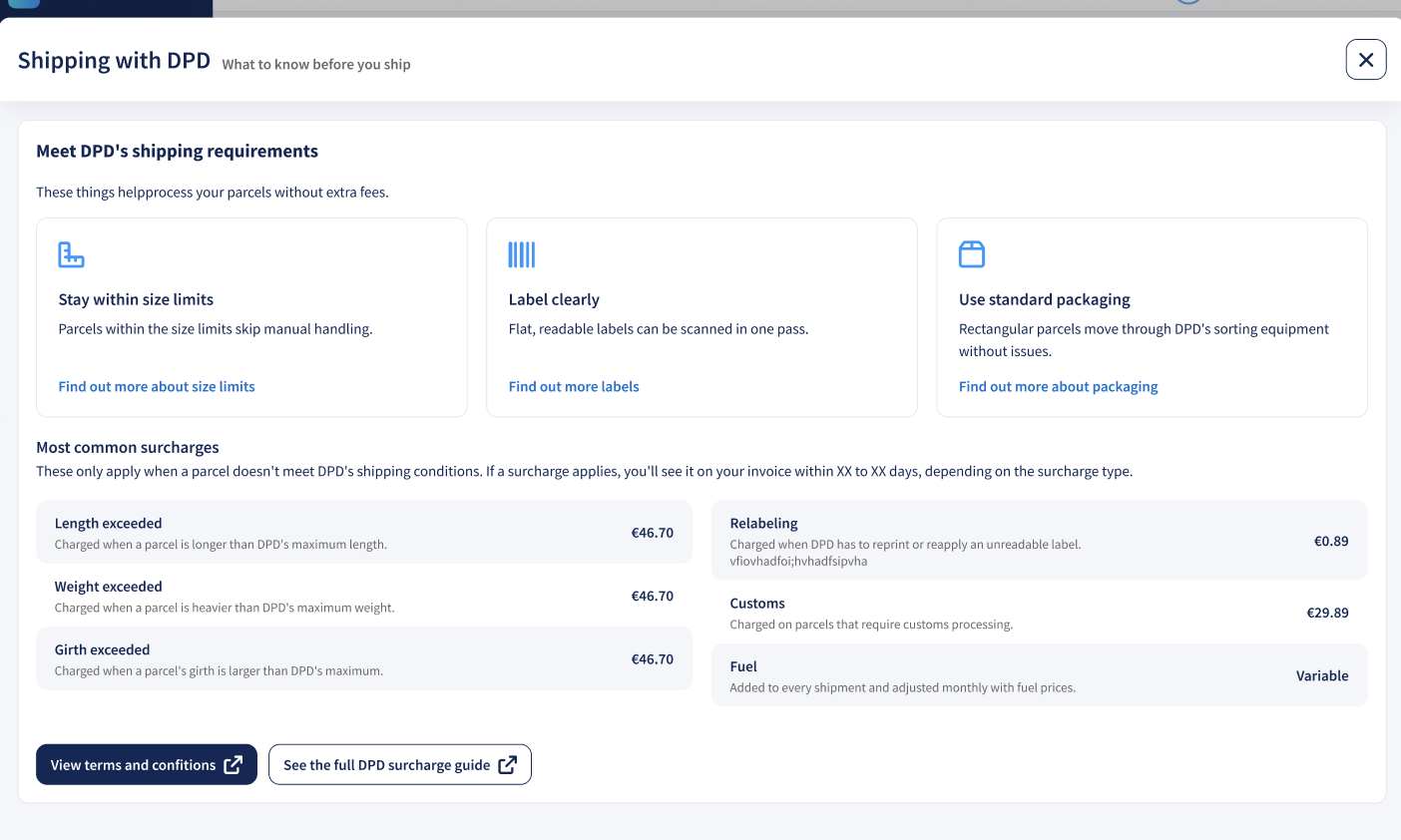
The window includes the following information:
- Shipping requirements: Practical tips to help you prepare your parcels correctly. Depending on the carrier, these may include size and weight limits, labeling instructions, packaging requirements, and other important shipping conditions.
- Most common surcharges: An overview of common additional charges, including their amounts where available and a short explanation of when they apply.
- Links to more information: Direct links to detailed shipping requirements, carrier terms and conditions, and surcharge documentation.
Example of a surcharge
For example, a carrier may charge an additional fee if your parcel exceeds its maximum dimensions, requires special handling, or has an unreadable shipping label. Reviewing the information in advance can help you avoid these charges.
Where can I find the full carrier shipping conditions?
You can access more detailed information directly from the links in the carrier overview window. Alternatively, visit our Carrier Help Center, select your carrier, and open the relevant shipping conditions and surcharge articles.
These articles provide more detailed information about shipping restrictions, additional charges, and carrier-specific requirements.
Ship with your own carrier rates
If you already have a contract with a carrier supported by Sendcloud, you can connect it to your account and ship using the rates and conditions agreed upon directly with that carrier.
This allows you to manage shipments through Sendcloud while continuing to use your existing carrier agreement.
How to add your own carrier contract
- In your Sendcloud panel, go to Shipping > Carriers.
- Find the carrier you have a contract with.
- Click Add own contract.

- Follow the instructions to enter the required contract details and connect your carrier account.
The required credentials and configuration steps depend on the carrier. You can find detailed instructions in the relevant contract activation article in our Carrier Help Center.
For more information, read How can I add my own carrier contract?
Compare carriers and shipping methods
Different carriers offer different shipping methods, delivery options, and rates. Comparing them can help you choose the most suitable option for each shipment.
Use the price list in your Sendcloud panel to compare shipping and return rates and find the options that best suit your needs.
When comparing carriers, consider more than just the shipping price. Delivery destinations, parcel dimensions, weight restrictions, and potential surcharges can also influence the final cost of your shipment.
Can I use multiple carriers?
Yes. You can enable multiple carriers with Sendcloud rates and connect multiple carrier contracts, giving you more flexibility when selecting shipping methods.
You can also combine Sendcloud rates with your own carrier contracts.
How to combine Sendcloud rates and your own carrier contracts
If both Sendcloud rates and your own contract are available for a shipment, you can choose which option to use before creating the shipping label.
- Open the shipment in the shipment edit view.
- Find the Carrier contract section.
- Select the contract or Sendcloud rates you want to use for that shipment.
- Continue creating your shipping label.
You can also use shipping rules to automate the selection of shipping options based on your configured conditions.
If you have multiple contracts with the same carrier, read How to add multiple contracts with the same carrier and create labels.
Before you start shipping
Once you've enabled your carriers, make sure your parcels meet their shipping requirements. This can help prevent delivery issues and unexpected additional charges.
- Check parcel dimensions and weight: Make sure your parcel meets the limits of the selected shipping method.
- Use suitable packaging: Follow the carrier's packaging requirements to avoid additional handling charges.
- Attach labels correctly: Make sure your shipping labels are clearly printed, readable, and properly attached to your parcels.
- Review shipping conditions: Check the carrier's requirements and potential surcharges, especially when using a new shipping method or destination.