
Purpose: Learn how to enable pick-up returns via the return portal so you can arrange to have a carrier collect a return parcel directly from your customer.
Related articles
→ How do I set up my return portal?
What are pick-up returns?
A pick-up return is a return method you can offer to your customers through the Return portal. Once enabled, customers will be able to request a carrier collect a parcel directly from their address to return to you. Your customers can easily arrange a pick-up themselves via the Return portal.
The pick-up return feature allows you to go the extra mile for your customers who can't easily access a parcel shop, or for parcels which are too large to return easily. Your customer doesn't even need to print out the return label - the driver who collects the return parcel will label it on their behalf.
Which carriers support pick-up returns?
How can I enable pick-up returns in my account?
- In your Sendcloud account, go to Returns > Return portal
-
Under the section Return method, tick the box Arrange a pick-up
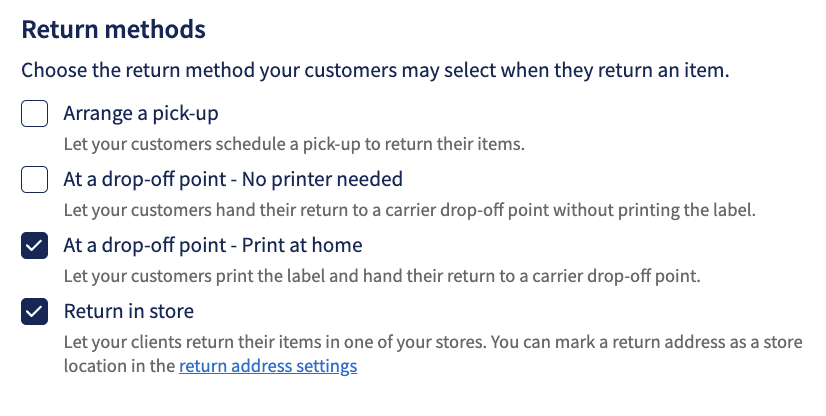
-
Scroll down to the section Enabled carriers and ensure you select a carrier which supports pick-up returns (GLS NL, DHL Express NL, CTT Express, SEUR, Evri dropoff, Poste Delivery Business, UPS)*
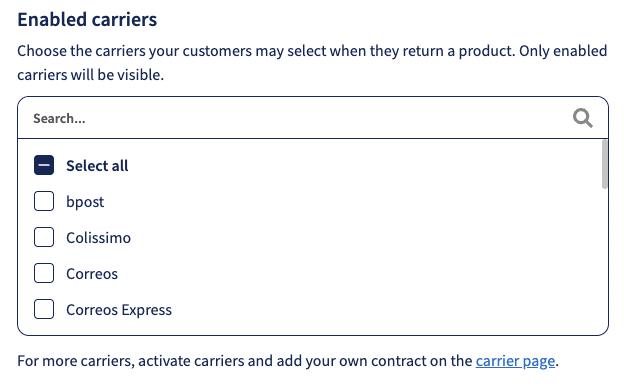
How can my customer request a pick-up return?
If you have already activated your Return portal, customers will be able to select pick-up return as a return option once they have entered their tracking number/order number and postcode and selected a return reason. You can find out more about how customers can make returns here.
-
In the Return portal, select Arrange a pick-up from the list of options in the section How would you like to return
- On the Summary page, click Confirm
- The customer will see a Success page and receive an email confirmation which will confirm the pick-up date (next working day).
- The pick-up will now be scheduled for collection the next working day (GLS NL, DHL Express NL) (if scheduled before 17:00) between 9:00-17:00 and returned to the sender's address. Once the pick-up is confirmed, a more accurate pick-up time will be communicated by the carrier by email to your customer.
- It's not necessary for your customer to print out the return shipping label when they schedule a return pick-up with GLS NL or CTT Express. The driver who will perform the pick-up will bring the return label and label the parcel when the collection takes place. When you ship with DHL Express NL, we advise putting the label in the box of the outgoing shipment or sending the client a PDF with a return label via email at a later time.
How can I cancel a pick-up return?
You must cancel the pick-up return before 5 pm on the same day as you book the return. The return will take place the following day; therefore, any cancellations received after this time will not be received by the carrier on time, and the pick-up return will still take place, and you will still be charged.
- In the Sendcloud panel, go to the Returns > Overview
- Locate your pick-up return in the list of return labels
- Select the return in the list and click the Cancel returns button:
FAQ
Can I cancel a pick-up?
If your customer wants to cancel a return, you can cancel it on their behalf provided you do so before 5 pm on the day of booking. This is because the pick-up will take place on the next working day from when it is scheduled. Once cancelled, you will receive an email from the carrier to schedule a new pick-up.
Can my customer cancel a pick-up?
Only you can cancel a pick-up, either through the Sendcloud panel or by contacting the carrier directly. This must be done before 5pm on the day you book the pick-up return.
Can I change the time of a pick-up once it's been scheduled?
Unfortunately not. You can only cancel a pick-up completely, and then book a new one for the correct time.
What happens if the customer is not home when the carrier arrives to complete the pick-up?
You will be charged for the failed pick-up. The customer will receive an email to make a new appointment. You will also be charged for any new pick-up the customer books.