
Purpose: Learn how to connect your own Correos carrier contract with your Sendcloud account in a few steps.
⚠️ Mandatory Correos API migration
Correos is introducing a new API. The current Correos API will stop working on February 1st, 2026.
All merchants using Correos must update their API credentials to avoid service disruption.
👉 Read the migration guide and update your credentials
Step 1: Activate your Sendcloud subscription
Sendcloud offers three subscriptions with which you are able to use your own transport contract: Lite, Growth and Premium.
For more information regarding which plan is best for you and the needs of your business, you can always contact us via the support section of your Sendcloud account or click here.
Step 2: Enable your carrier contract
Once you have activated a Sendcloud subscription, you can connect your carrier contract.
In your Sendcloud panel navigate to Shipping > Carriers. Go to the My contracts tab and find Correos from the list. Click Add contract.
Step 3: Enter your Correos contract details
Important: Correos no longer provides Webservices credentials to new users. To connect your Correos contract in Sendcloud, you must use Correos ID (REST API credentials).
Before activating your contract in Sendcloud, make sure you have:
- Created a Correos ID account
- Generated your Client ID and Client Secret in the Correos ID platform
- Requested manual activation of your credentials from your Correos Sales Manager
- Ensured your Correos ID is linked to your Correos contract
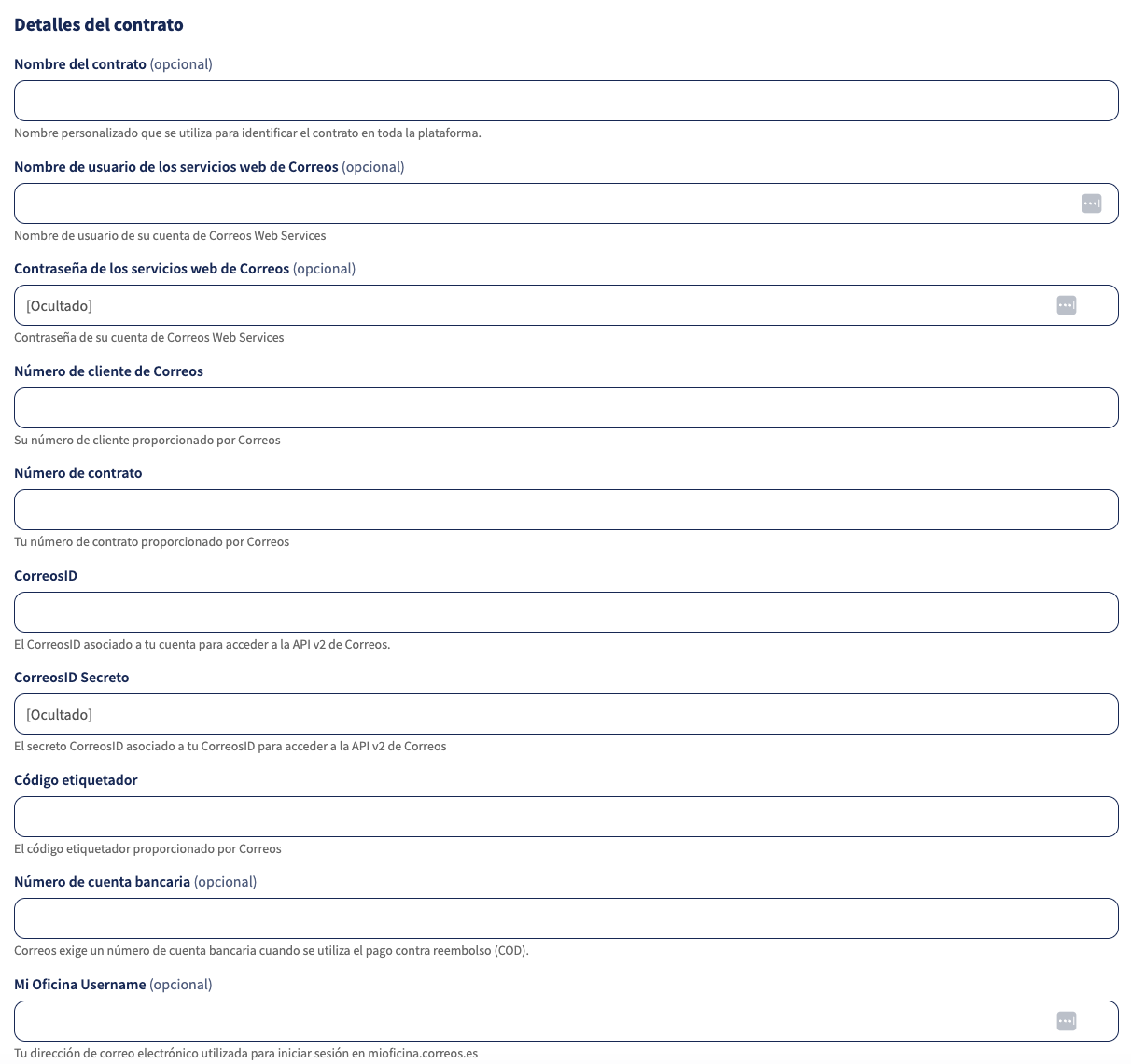
Once your Correos ID has been activated, prepare the following details:
- Contract name (optional)
- Correos ID: Client ID generated in Correos ID
- Correos ID Secret: Client Secret generated in Correos ID
- Número de Cliente: Client number
- Número de Contrato: Contract number
- Código etiquetador: Labeller
- Número de cuenta bancaria (optional): IBAN. Insert your IBAN number only if you plan to use Cash on Delivery with Correos. If not, leave this field empty.
- Usuario de acceso en Mi Oficina: Email address that you use to access mioficina.correos.es
Go to the Correos contract activation page in your Sendcloud panel (Shipping > Carriers > My contracts > Correos) and fill in the required fields. Then click Add this contract.
Using Webservices credentials (legacy)
If you already have Webservices credentials previously issued by Correos, you may continue using them. However, Correos no longer provides these credentials to new users.
Already connected to Correos?
Correos will shut down the current API on February 1st, 2026.
After this date, shipments will stop working unless you update your API credentials.
👉 Follow the migration guide to update your Correos credentials
Done! Once you've followed the steps above, your Correos contract should now be successfully linked to your Sendcloud platform and you can begin shipping on your Correos rates. When you create a label with a Correos shipping method, the label price will now show as 0.00 EUR in your account.