
Purpose: Learn how to activate a new TNT Italy contract in Sendcloud using the correct integration flow.
Step 1: Activate your Sendcloud subscription
Sendcloud offers three subscriptions with which you are able to use your own transport contract: Lite, Growth, and Premium.
For more information regarding which plan is best for you and the needs of your business, you can always contact us via the support section of your Sendcloud account or click here.
Step 2: Make sure you have your FedEx v2 contract credentials
Before connecting your contract in Sendcloud, make sure you have the credentials provided for your FedEx v2 / TNT setup by the carrier.
If you are not sure which credentials you need, contact your FedEx/TNT account manager before proceeding.
Step 3: Enable your TNT contract in Sendcloud via FedEx v2
Once your Sendcloud subscription is active and you have the correct contract credentials, go to your Sendcloud panel and navigate to Shipping > Carriers.
Open the My contracts tab and type TNT (you'll see the logo of FedEx). Then click Add contract.
In the contract setup form, enter the credentials required for your TNT/FedEx contract.
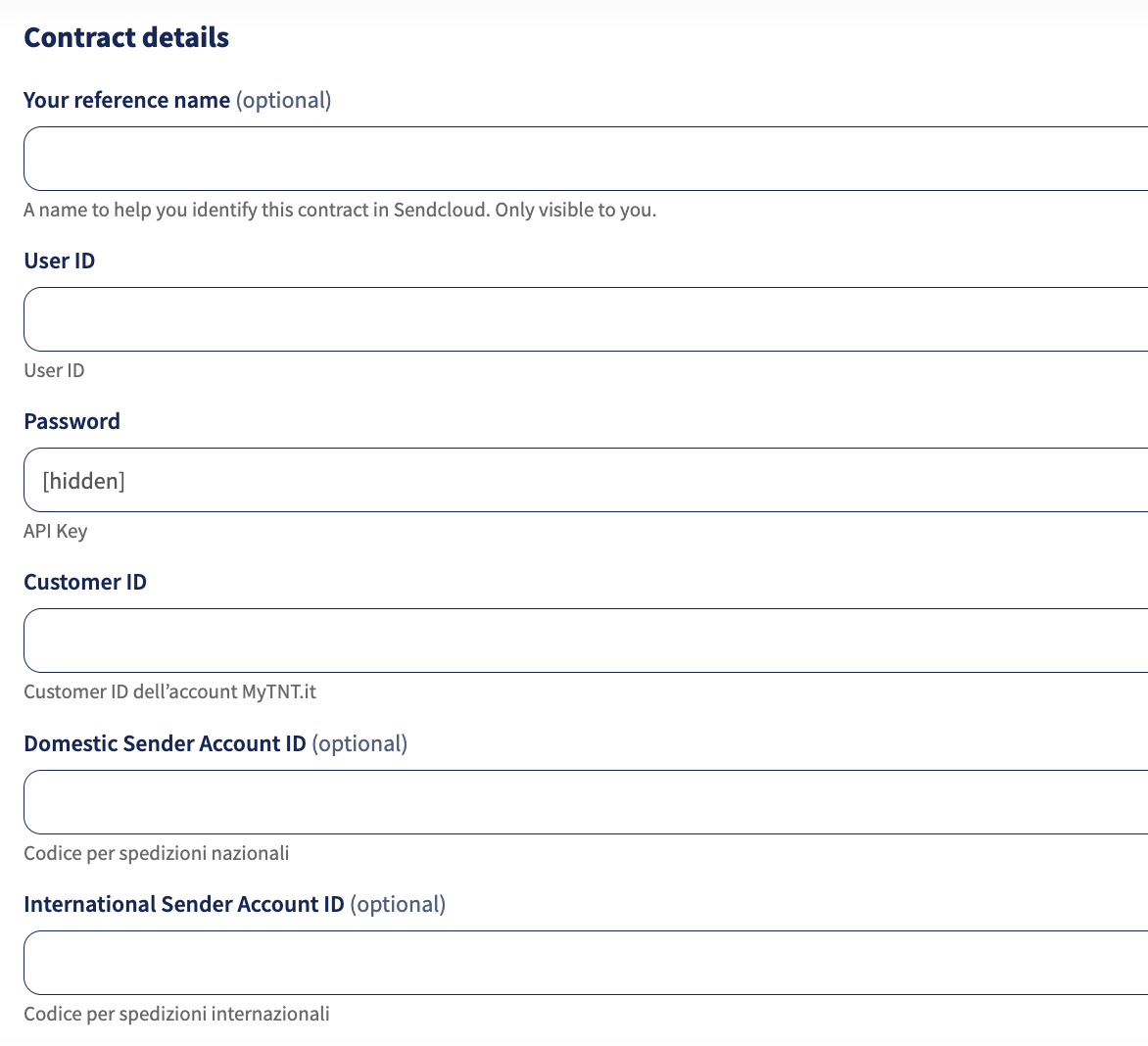
Step 4: Save the contract
After entering all required details, click Add this contract to save the connection.
Once the contract is successfully added, your TNT rates will be available.
Already using the old TNT integration?
If your TNT contract was connected previously through the old TNT integration, that setup may still exist in your account. However, all new TNT contracts must now be activated via FedEx.
If you are unsure whether your contract should be configured through the old setup or through FedEx, please contact Sendcloud Support or your carrier representative.
Direct contract shipping methods
Direct contract shipping methods
| Shipping method | Shipping method ID |
| TNT Economy Express Internazionale Pallet 0-1000kg | 6988 |
| TNT Economy Express Internazionale Pallet 0-1000kg - incoterm DDP | 6990 |
| TNT Economy Express Internazionale Pallet 0-1000kg - incoterm DAP | 6989 |
| TNT 12:00 Economy Express Internazionale Pallet 0-500kg | 6982 |
| TNT 12:00 Economy Express Internazionale Pallet 0-500kg - incoterm DDP | 6984 |
| TNT 12:00 Economy Express Internazionale Pallet 0-500kg - incoterm DAP | 6983 |
| TNT Economy Express Internazionale 0-70kg | 6985 |
| TNT Economy Express Internazionale 0-70kg - incoterm DDP | 6987 |
| TNT Economy Express Internazionale 0-70kg - incoterm DAP | 6986 |
| TNT 12:00 Economy Express Internazionale 0-70kg | 6979 |
| TNT 12:00 Economy Express Internazionale 0-70kg - incoterm DDP | 6981 |
| TNT 12:00 Economy Express Internazionale 0-70kg - incoterm DAP | 6980 |
| TNT Points Economy Express Nazionale 0-20kg | 6970 |
| TNT Economy Express Nazionale Small Box 0-30kg | 6973 |
| TNT Economy Express Nazionale Small Box COD 0-30kg | 6974 |
| TNT Economy Express Nazionale Large Box 0-40kg | 6975 |
| TNT Economy Express Nazionale Large COD Box 0-40kg | 6976 |
| TNT Economy Express Nazionale Pallet 0-500kg | 6971 |
| TNT Economy Express Nazionale 0-70kg | 6969 |
| TNT Economy Express Nazionale COD 0-70kg | 6972 |
| TNT Economy Express Nazionale Ritorno 0-70kg | 6977 |
| TNT Economy Express Nazionale Pick&Return 0-70kg | 6978 |
| TNT Express Internazionale Pallet 0-500kg | 7007 |
| TNT Express Internazionale Pallet 0-500kg - incoterm DDP | 7009 |
| TNT Express Internazionale Pallet 0-500kg - incoterm DAP | 7008 |
| TNT Express Internazionale 0-70kg | 7004 |
| TNT Express Internazionale 0-70kg - incoterm DDP | 7006 |
| TNT Express Internazionale 0-70kg - incoterm DAP | 7005 |
| TNT Points Express Nazionale 0-20kg | 6998 |
| TNT 10:00 Express Nazionale COD 0-30kg | 6992 |
| TNT Express Nazionale Small Box 0-30kg | 7000 |
| TNT Express Nazionale Small Box COD 0-30kg | 7001 |
| TNT 10:00 Express Nazionale 0-30kg | 6991 |
| TNT Express Nazionale Large Box 0-40kg | 7002 |
| TNT Express Nazionale Large Box COD 0-40kg | 7003 |
| TNT Express Nazionale Pallet 0-500kg | 6999 |
| TNT 12:00 Express Nazionale Pallet 0-500kg | 6995 |
| TNT Express Nazionale 0-70kg | 6996 |
| TNT Express Nazionale COD 0-70kg | 6997 |
| TNT 12:00 Express Nazionale COD 0-70kg | 6994 |
| TNT 12:00 Express Nazionale 0-70kg | 6993 |
Done! Once you've followed the steps above, your TNT contract should now be successfully linked to your Sendcloud platform and you can begin shipping on your TNT rates. When you create a label with a TNT shipping method, the label price will now show as 0.00 EUR in your account.