
Purpose: Learn how to connect your own WeGrow carrier contract to your Sendcloud account in three simple steps. This feature is available starting from the Light subscription
Step 1: Activate your Sendcloud subscription
Sendcloud offers three subscriptions with which you are able to use your own transport contract: Lite, Growth and the Premium plan.
For more information regarding which plan is best for you and the needs of your business, you can always contact us via the support section of your Sendcloud account or click here.
Step 2: Connect your WeGrow contract
- In your Sendcloud account, go to Shipping > Carriers
- Click on the My contracts tab
- Click Add your own contract
- Find WeGrow in the list of carriers and click Add contract
Step 3: Enter your WeGrow account details
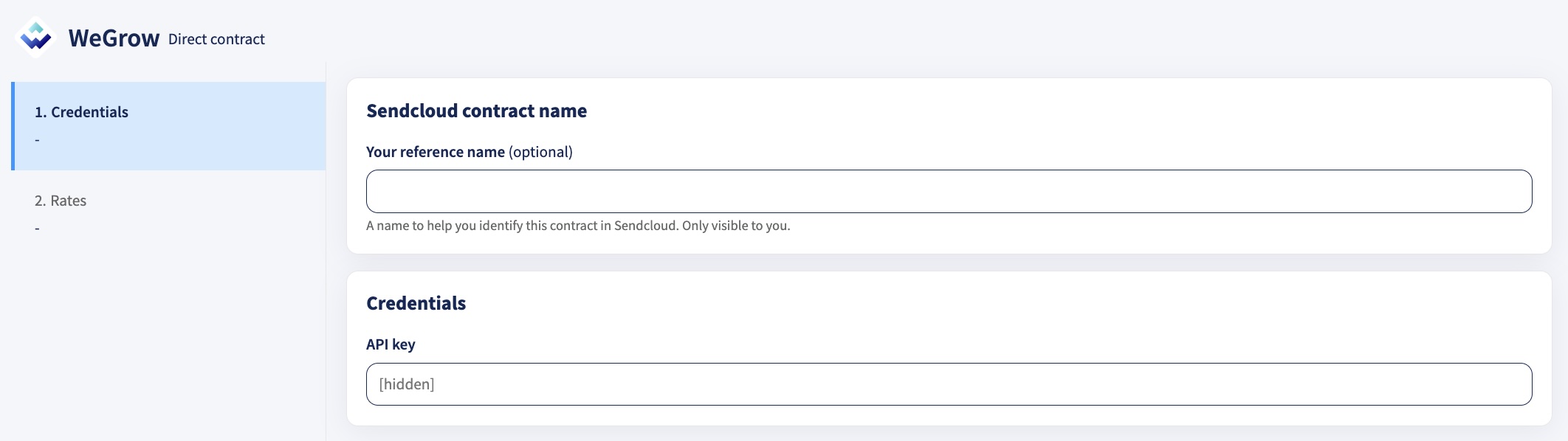
Next you fill in your WeGrow contract details. If you haven't received those yet, you can request them via your WeGrow account manager:
Your reference name - A name to help you identify this contract in Sendcloud. Only visible to you.
API Key - Provided by your WeGrow account manager
Direct contract shipping methods
The following direct shipping methods for WeGrow are supported in Sendcloud. If a shipping method is not visible in your Sendcloud panel, please contact your WeGrow account manager to have it activated in your contract.
Direct contract shipping methods
| Shipping method | Shipping method ID |
| WeGrow Freight | 32502 |
| WeGrow Home Economy | 32489 |
| WeGrow Home Economy – Age Check | 32491 |
| WeGrow Home Economy – Saturday | 32492 |
| WeGrow Home Economy – Signature | 32490 |
| WeGrow Home Premium | 32485 |
| WeGrow Home Premium – Age Check | 32487 |
| WeGrow Home Premium – Saturday | 32488 |
| WeGrow Home Premium – Signature | 32486 |
| WeGrow Letterbox Economy | 32494 |
| WeGrow Letterbox Premium | 32493 |
| WeGrow Master Box Economy | 32498 |
| WeGrow Master Box Premium | 32497 |
| WeGrow PUDO Economy | 32496 |
| WeGrow PUDO Premium | 32495 |
| WeGrow Domestic Return | 32503 |
| WeGrow Direct Return | 32504 |
| WeGrow Tracked Parcel | 32499 |
| WeGrow Tracked Letterbox | 32500 |
| WeGrow Untracked | 32501 |
Configure service point delivery methods
If you use WeGrow for service point deliveries, you may need to follow a specific shipping method naming convention to ensure that shipments are assigned to the correct carrier.
This is particularly important if you have both WeGrow and a direct contract with one of its last-mile carriers (such as DHL or DPD) enabled in your Sendcloud account.
Shipping method naming convention
If you want WeGrow to take priority over a directly enabled carrier, use the following naming convention when configuring your service point delivery method in your checkout:
Service point delivery [PARTNER] via [CARRIER]
For example, if you use WeGrow for deliveries handled by DHL, name the shipping method:
Service point delivery WeGrow via DHL
This ensures that Sendcloud prioritizes WeGrow when assigning shipments, while customers see the last-mile carrier's branding in the service point map during checkout.
How shipping methods are prioritized
| Shipping method name | Behaviour |
|---|---|
| Service point delivery WeGrow via DHL | WeGrow takes priority over DHL. |
| Service point delivery DHL | If DHL is directly enabled in your Sendcloud account, DHL takes priority over WeGrow. |
| Service point delivery DHL | If DHL is not directly enabled, only service points available through WeGrow are shown. |
Done! Once you've followed the steps above, your WeGrow contract should now be successfully linked to your Sendcloud platform and you can begin shipping on your WeGrow rates. When you create a label with a WeGrow shipping method, the label price will now show as 0.00 EUR in your account.