
Purpose: This article explains how order status filtering works for your WooCommerce V2 integration and how to choose which orders are imported into Sendcloud, so your order overview only contains orders that are ready to be processed.
What is order status filtering?
Order status filtering lets you choose which WooCommerce orders are imported into Sendcloud, based on their order status in your store.
This matters for your shipping workflow: only orders with a selected status are imported, and only imported orders appear in Sendcloud, where you can create labels for them. Orders with a status you haven't selected stay in WooCommerce and are not available in Sendcloud. Filtering is useful if you want to keep completed, cancelled, or refunded orders out of your order overview and focus on orders that still need to be shipped.
Default order statuses
When you connect WooCommerce to Sendcloud, three statuses are selected by default: Pending, Processing, and On-hold. Orders with other statuses, such as Completed or Cancelled, are not imported unless you select those statuses in your integration settings.
Change which order statuses are imported
You can change your order status filter at any time in your integration settings:
- In your Sendcloud panel, go to Settings > Integrations and open the settings of your WooCommerce integration.
- Scroll to the Order import section.
- Make sure Filter orders by status is selected.
- Under Order statuses, select the statuses you want to import from WooCommerce. You must select at least one status.
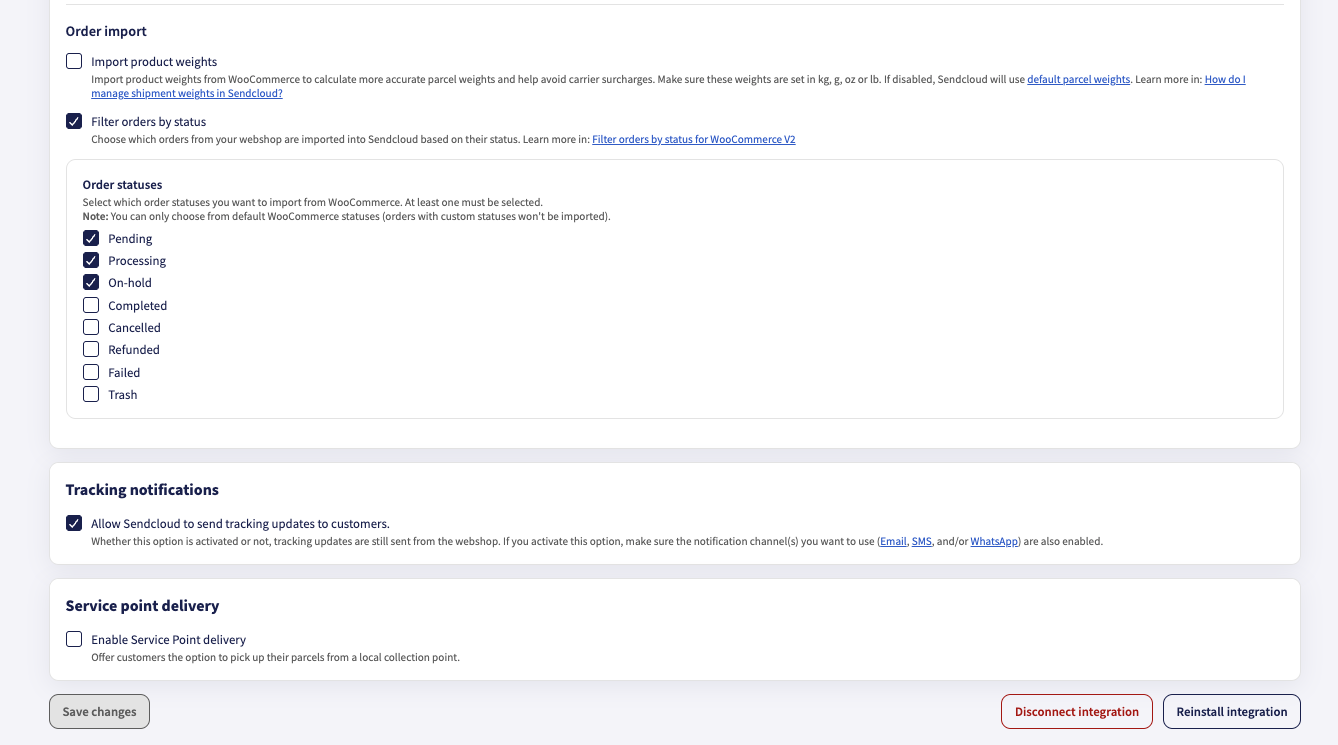
- Click Save changes.
After you save, Sendcloud imports orders with the newly selected statuses during future imports.
What happens if you disable order status filtering? If you disable Filter orders by status, Sendcloud no longer restricts order imports to the statuses selected in the filter. Orders with supported WooCommerce statuses can be imported regardless of their status. Custom order statuses are not supported.
Tips
- If orders are missing in Sendcloud, first check that their WooCommerce status is selected in your filter, and that it's one of the default WooCommerce statuses.
- Not sure which statuses to select? Start with the defaults (Pending, Processing and On-hold) and add others only if you need to ship orders in those statuses.