
Purpose: Learn what VAT, EORI, IOSS, and VOEC numbers are, when you may need them for international shipping, and how to add them to your sender addresses in Sendcloud.
Understanding tax numbers for international shipping
When shipping internationally, you may need different tax identification numbers depending on your business, shipping destination, and carrier.
What is an EORI number?
An EORI (Economic Operators Registration and Identification) number identifies businesses involved in customs activities, such as importing or exporting goods.
Businesses trading goods outside the EU may need an EORI number. EU EORI numbers are issued by the customs authorities of an EU Member State and registered in a database accessible to customs authorities across the EU.
An EU EORI number consists of a country code followed by a unique identification number. For example, an EORI number issued in the Netherlands starts with NL.
Other tax numbers
- VAT number: Identifies your business for value-added tax purposes.
- GB EORI number: Used for customs identification when moving goods to or from Great Britain.
- GB VAT number: Identifies your business for UK VAT purposes.
- IOSS number: Used under the Import One-Stop Shop scheme for eligible goods imported into the EU in consignments valued at no more than €150.
- VOEC number: Used under Norway's VAT On E-Commerce scheme for eligible goods sold to consumers in Norway. A VOEC number consists of exactly 7 digits.
How to apply for an EORI number
If you do not have an EORI number, you can apply for one free of charge through the relevant customs authorities. The application process varies by country.
Where can I apply for an EORI number?
Select your country below for more information:
How to add your tax numbers in Sendcloud
You can add your VAT, EORI, IOSS, and VOEC numbers directly to your sender addresses in Sendcloud. When applicable, Sendcloud includes these numbers on the customs documents it generates for you.
Follow the three steps below to add your tax numbers.
Step 1: Open your sender address
- In your Sendcloud panel, go to Settings > Addresses > Sender.
- Click Create new to add a sender address, or edit an existing one.
- Scroll down to the Business Details section.
Step 2: Enter your tax numbers
In Business Details, you will find different fields based on your shipping destinations. Fill in the fields relevant to your business.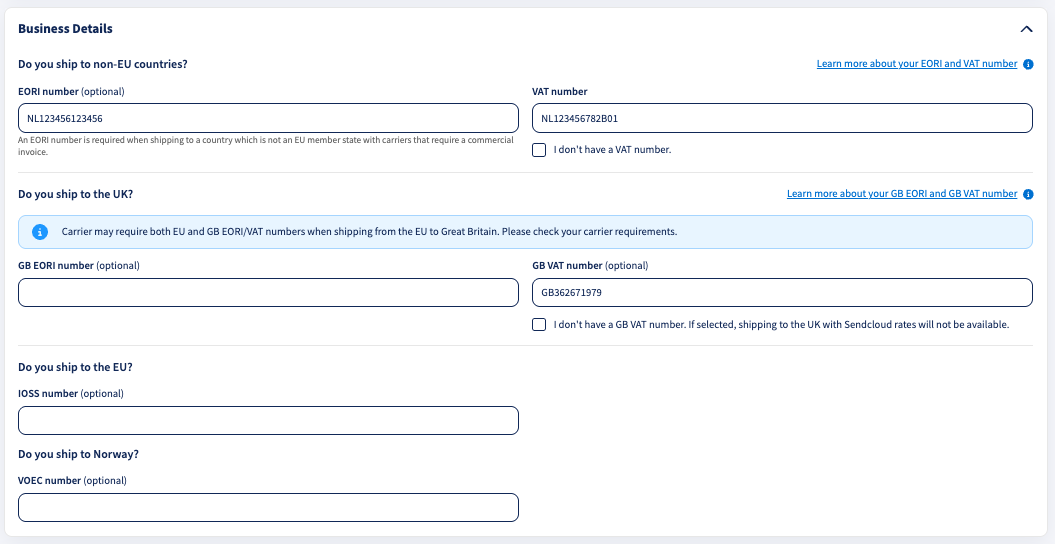
Do you ship to non-EU countries?
This section contains:
- EORI number: Enter your EORI number for customs identification.
- VAT number: Enter your business VAT number. If you do not have one, select I don't have a VAT number.
An EORI number may be required when shipping outside the EU with carriers that require a commercial invoice.
Do you ship to the UK?
This section contains:
- GB EORI number: Enter your EORI number issued for Great Britain.
- GB VAT number: Enter your UK VAT number. If you do not have one, select I don't have a GB VAT number.
Do you ship to the EU?
Under IOSS number (optional), enter your IOSS number if your business is registered under the Import One-Stop Shop scheme.
IOSS is used for eligible goods imported into the EU from outside the EU in consignments valued at no more than €150.
Do you ship to Norway?
Under VOEC number (optional), enter your VOEC number if your business is registered under Norway's VAT On E-Commerce scheme.
The VOEC scheme applies to eligible low-value goods sold to consumers in Norway. It allows registered businesses to collect Norwegian VAT at checkout.
Your VOEC number must:
- Contain exactly 7 digits.
- Contain numbers only.
Step 3: Save your sender address
Once you have entered the relevant tax numbers, click Save.
Your tax numbers are now saved to the selected sender address and can be used for applicable international shipments.
FAQ
Who needs an EORI number?
Businesses established in the EU that carry out customs activities generally need an EORI number.
For more information, visit the European Commission website .
If your business is based in Great Britain, you may also need an EORI number when shipping internationally. Read more on GOV.UK .
What are the customs procedures for import and export in Europe?
If your business is based in the EU, consult the European Commission's Taxation and Customs Union for information about import and export procedures.
For UK businesses, visit the GOV.UK import and export guidance .
How do I contact customs authorities?
To contact customs authorities in an EU Member State, consult the European Commission's list of national customs administrations .
For UK customs enquiries, contact HM Revenue & Customs (HMRC) .
How can I check if an EORI number is valid?
You can check your EORI number using the following official tools: