
Purpose: Learn how to connect either your Amazon Shipping contract or your Amazon Buy Shipping account to Sendcloud in three easy steps.
The Sendcloud subscription plans have been updated. If the subscriptions shown in the banner above don’t match your current subscription plan and you’d like to know more, please click here.
Overview: Contract Requirements & Availability
Amazon Shipping (via Shipper Central)
-
A separate contract with Amazon is required.
If you don’t have one, please contact Amazon directly via their official website. -
Availability:
Amazon Shipping remains available in all existing supported markets (Italy, France, UK, Spain)
Amazon Buy Shipping (via Seller Central)
-
No separate shipping contract is required.
You only need to connect your Amazon Seller Central account to Sendcloud and accept the carrier's terms and conditions in Seller Central. -
Availability:
Currently available only in the UK and Germany.
This is the first phase of the rollout; Spain and Italy will be supported at a later stage.
Before you connect
Amazon Shipper Central (Amazon Shipping)
- What it is: Amazon’s platform for managing transportation and delivery logistics.
- Who it’s for: Merchants (Amazon sellers or non-sellers) who want to use Amazon Shipping as a carrier to send orders from Amazon or other sales channels.
- Why it matters: If you want to ship with Amazon Shipping, you’ll connect your contract using the Shipper Central login.
Amazon Seller Central
- What it is: Amazon’s platform for managing product listings, inventory, orders, and customer service on Amazon’s marketplace.
- Who it’s for: Merchants who sell products directly on Amazon.
Amazon Buy Shipping
- What it is: A service within Seller Central that allows Amazon sellers to buy Amazon-compliant shipping labels directly from Amazon.
- Who it’s for: Merchants who sell on Amazon and need labels that meet Amazon’s delivery and Prime requirements.
-
Availability:
- Currently available for Sendcloud customers in the UK and Germany.
- Spain and Italy will be added soon.
- Important: To use Amazon Buy Shipping in Sendcloud, you must log in via the “Login with Amazon Seller Central by country” option and accept the carrier terms & conditions within Amazon Seller Central. No separate shipping contract is needed.
| Platform | Purpose | Use Case |
| Amazon Shipper Central | Manage transportation and delivery logistics through Amazon Shipping as a carrier. | For merchants (Amazon sellers or not) who want to use Amazon Shipping for logistics. |
| Amazon Seller Central | Manage product listings, inventory, orders, and customer service on Amazon's marketplace. | For merchants who sell products on Amazon’s marketplace. |
| Amazon Buy Shipping | Purchase Amazon-compliant shipping labels directly from Seller Central. | For Amazon sellers who want to streamline the shipping process and ensure compliance with Amazon’s standards. (Currently available in the UK & Germany; Spain and Italy coming soon) |
Step 1: Activate your Sendcloud subscription
Sendcloud offers three subscriptions with which you are able to use your own transport contract: Lite, Growth, and Premium.
For more information regarding which plan is best for you and the needs of your business, you can always contact us via the support section of your Sendcloud account or click here.
Step 2: Connect your Amazon contract
You can now connect your Amazon contract using two different login flows, depending on whether you are using Amazon Shipping or Amazon Buy Shipping.
Amazon Shipping: Accessible to any merchant (Amazon sellers or not) who has signed a contract directly with Amazon via Shipper Central.
Amazon Buy Shipping: Accessible only to merchants selling on Amazon through Seller Central, and requires acceptance of the carrier’s terms and conditions within Seller Central
A. Connect Amazon Shipping (via Amazon Shipper Central)
- Go to Shipping > My Contracts > Add your own contract
- Find Amazon in the list of carriers and click Add contract
- Use the dropdown "Login with Amazon Shipper Central by country" to select the country where you're active in Amazon
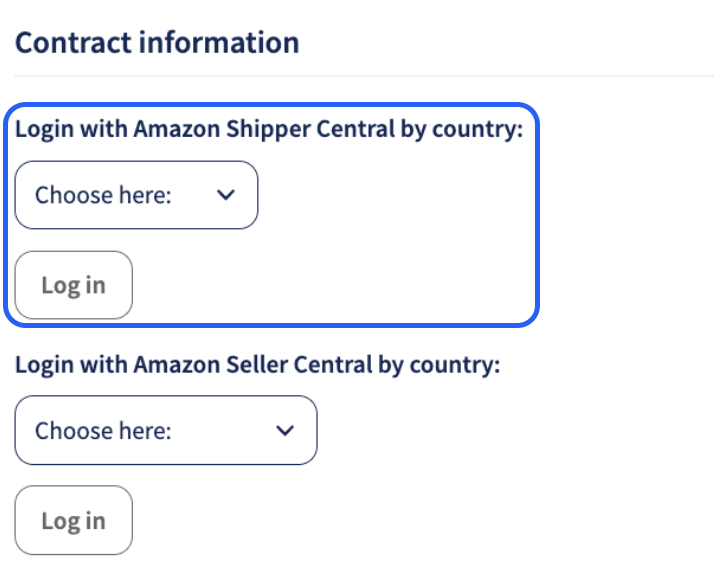
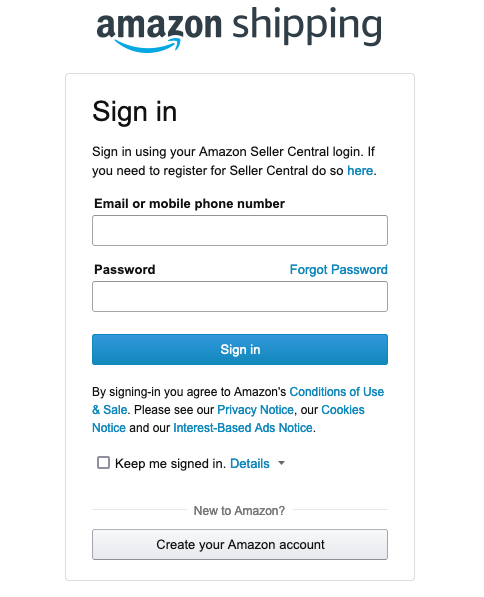
- You'll be redirected to the login page of Amazon Shipping; make sure you log in with the administrator credentials of the main account
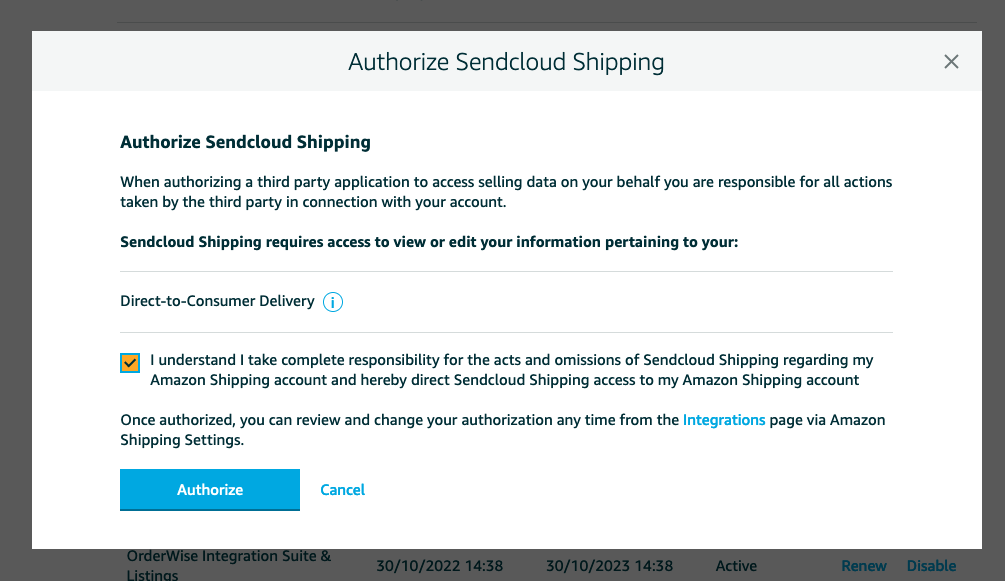
- Select the checkbox and click on Authorize; you'll be redirected to the Sendcloud panel
-
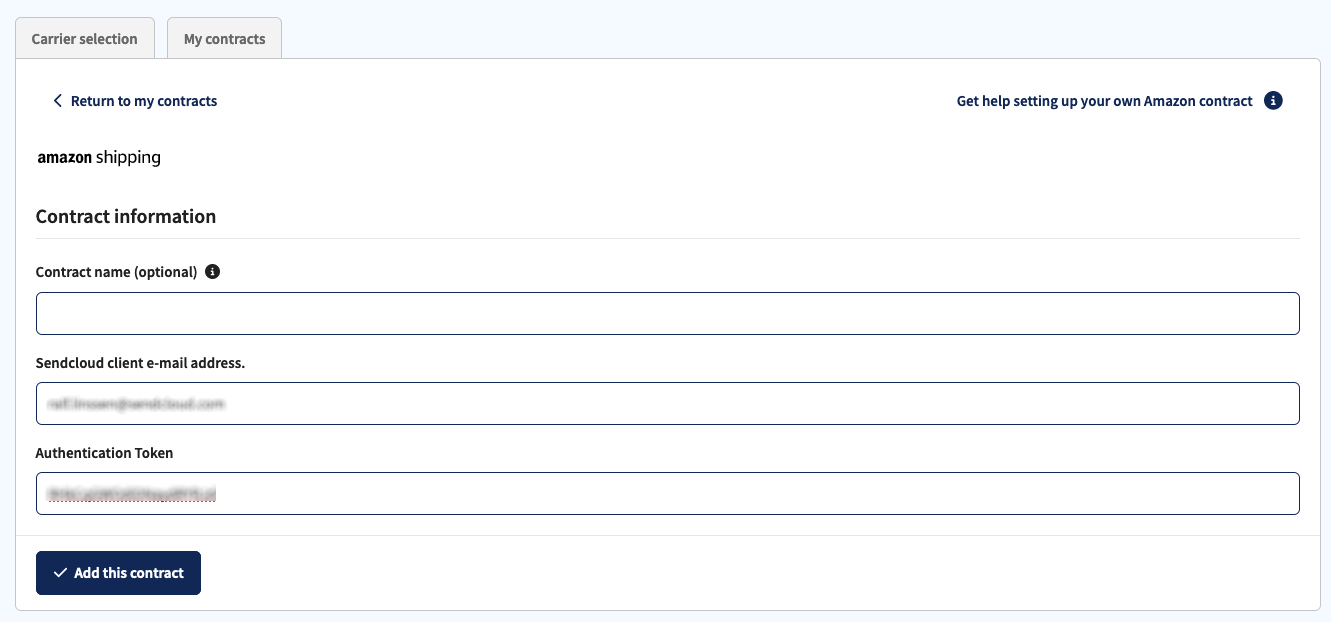
The Authentication Token is prefilled after you are redirected; please add your Sendcloud email address and click on Add this contract.
B. Connect Amazon Buy Shipping (via Amazon Seller Central)
Use this flow if you want to use Amazon Buy Shipping, which allows you to purchase Amazon-compliant labels directly from Amazon Seller Central.
- Go to Shipping > My Contracts > Add your own contract
- Select Amazon from the carrier list and click Add contract
- Use the dropdown "Login with Amazon Seller Central by country" to select the country where you're active on Amazon
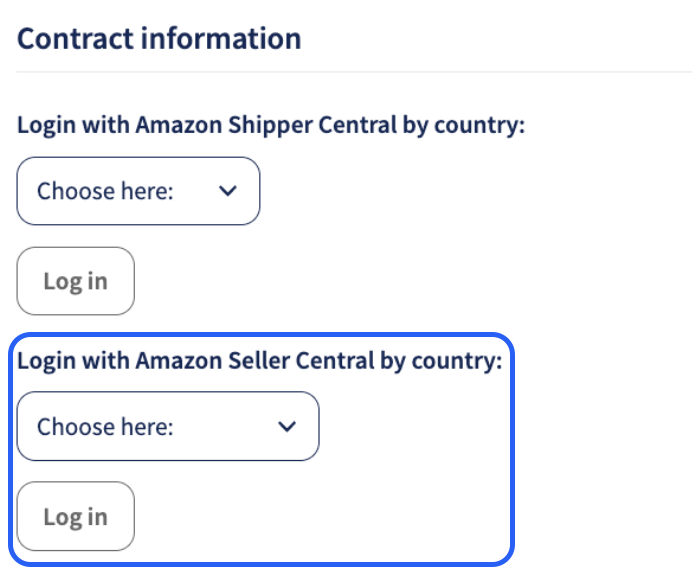
- You will be redirected to Amazon Seller Central
- Log in using your Seller Central credentials
- Check the authorization box and click Authorize
- You’ll be redirected back to Sendcloud
- The Authentication Token will already be prefilled
- Enter your Sendcloud email address and click Add this contract
- Accept Amazon’s T&Cs for each carrier you plan to use:
- Go to:
https://sellercentral.amazon.XX/orders-st/terms-and-conditions - Replace
XXwith the appropriate country code (e.g.,de,uk,fr)
Difference between ON and OFF shipping methods
When using Amazon integrations in Sendcloud, you’ll see different types of shipping methods. It’s important to understand what each type means so you can choose the correct option for your workflow.
- ON Amazon: For Amazon orders imported via Amazon integration.
- OFF Amazon: For orders imported from other platforms (e.g., Shopify) using Amazon Shipping as a carrier.
By choosing the correct method, you ensure your shipments are compliant with Amazon’s rules and that the right labels are generated automatically.
ON Amazon
-
What it is:
ON Amazon methods are used only for orders imported directly from your Amazon integration. These methods ensure your Amazon order labels are fully compliant with Amazon’s requirements. -
When to use:
If you’re fulfilling an order placed on Amazon, always choose an ON Amazon method. -
Example:
Amazon UK - Shipping One-Day Tracked (On Amazon Label) 0-20 kg -
Automation tip:
You can automate this by creating a shipping rule in Sendcloud:IF Integration IS Amazon THEN Ship with [all ON Amazon methods you want to use]
OFF Amazon
-
What it is:
OFF Amazon methods are for orders imported from other sales channels (e.g., Shopify, WooCommerce, Magento) not from Amazon directly. -
When to use:
If you’re shipping an order from a non-Amazon integration but still want to use Amazon Shipping as your carrier, choose an OFF Amazon method. -
Example:
Amazon UK - Shipping One-Day Tracked (Off Amazon Label) 0-20 kg
Direct contract shipping options
The following direct contract shipping options for Amazon shipping are supported in Sendcloud. If a shipping option is not visible in your Sendcloud panel, please contact your Amazon shipping account manager to have it activated in your contract.
Direct contract shipping options
| Shipping method | Shipping method ID | Shipping options | Shipping option code |
| Amazon UK Shipping One-Day Tracked (On Amazon Label) 0-20kg | 7057 | Amazon UK Shipping One-Day Tracked (On Amazon Label) | amazon:one-day_tracked_on |
| Amazon UK Shipping One-Day Tracked (Off Amazon Label) 0-20kg | 7058 | Amazon UK Shipping One-Day Tracked (Off Amazon Label) | amazon:one-day_tracked_off |
| Amazon UK Shipping Two Day Tracked (On Amazon Label) 0-20kg | 7059 | Amazon UK Shipping Two Day Tracked (On Amazon Label) | amazon:two-day_tracked_on |
| Amazon UK Shipping Two Day Tracked (Off Amazon Label) 0-20kg | 7060 | Amazon UK Shipping Two Day Tracked (Off Amazon Label) | amazon:two-day_tracked_off |
| Amazon UK Shipping Standard Tracked (On Amazon Label) 0-20kg | 7061 | Amazon UK Shipping Standard Tracked (On Amazon Label) | amazon:standard_tracked_on |
| Amazon IT - Spedizione Nazionale Espressa (On Amazon Label) 0-15kg | 7062 | Amazon IT - Spedizione Nazionale Espressa (On Amazon Label) | amazon:national_express_on |
| Amazon IT - Spedizione Nazionale Espressa (Off Amazon Label) 0-15kg | 7063 | Amazon IT - Spedizione Nazionale Espressa (Off Amazon Label) | amazon:national_express_off |
| Amazon FR - Next Day Service (On Amazon Label) 0-15kg | 7064 | Amazon FR - Next Day Service (On Amazon Label) | amazon:nextday_fr_on |
| Amazon ES Shipping One-Day Tracked (On Amazon) 0-15kg | 8705 | Amazon ES Shipping One-Day Tracked (On Amazon Label) | amazon:one-day-on-es |
| Amazon FR - Next Day Service (Off Amazon Label) 0-15kg | 8780 | Amazon FR - Next Day Service (Off Amazon Label) | amazon:nextday_fr_off |
| Amazon ES Shipping One-Day Tracked (Off Amazon) 0-15kg | 8781 | Amazon ES Shipping One-Day Tracked (Off Amazon Label) | amazon:one-day-off-es |
| Amazon x Correos Express ePaq 24 | 29172 | Amazon x Correos Express | amazon:fbm_cex |
| Amazon x SEUR 24 | 29173 | Amazon x SEUR | amazon:fbm_seur |
| Amazon x BRT Express | 29228 | Amazon x BRT | amazon:fbm_brt |
| Amazon x TNT Express | 29229 | Amazon x TNT | amazon:fbm_tnt |
| Amazon x DPD ExpressPak Next Day | 29780 | Amazon x DPD GB | amazon:fbm_dpd_gb |
| Amazon x DPD Parcel Next Day | 29781 | Amazon x DPD GB | amazon:fbm_dpd_gb |
| Amazon x Hermes Next Day | 29782 | Amazon x EVRi | amazon:fbm_evri |
| Amazon x Hermes Standard | 29783 | Amazon x EVRi | amazon:fbm_evri |
| Amazon x Hermes Standard - Drop Off | 29784 | Amazon x EVRi | amazon:fbm_evri |
| Amazon x Hermes Two Day - Drop Off | 29785 | Amazon x EVRi | amazon:fbm_evri |
| Amazon x Royal Mail 1st Class Large Letter | 29786 | Amazon x Royal Mail | amazon:fbm_royalmail/first |
| Amazon x Royal Mail 1st Class Medium Parcel | 29787 | Amazon x Royal Mail | amazon:fbm_royalmail/first |
| Amazon x Royal Mail 1st Class Small Parcel | 29788 | Amazon x Royal Mail | amazon:fbm_royalmail/first |
| Amazon x Royal Mail 2nd Class Large Letter | 29789 | Amazon x Royal Mail | amazon:fbm_royalmail/second |
| Amazon x Royal Mail 2nd Class Medium Parcel | 29790 | Amazon x Royal Mail | amazon:fbm_royalmail/second |
| Amazon x Royal Mail 2nd Class Small Parcel | 29791 | Amazon x Royal Mail | amazon:fbm_royalmail/second |
| Amazon x Royal Mail Special Delivery Guaranteed by 1pm | 29792 | Amazon x Royal Mail | amazon:fbm_royalmail/sd |
| Amazon x Royal Mail 24 (Large Letter) (CRL) | 29793 | Amazon x Royal Mail | amazon:fbm_royalmail/24 |
| Amazon x Royal Mail 24 (Parcel) (CRL) | 29794 | Amazon x Royal Mail | amazon:fbm_royalmail/24 |
| Amazon x Royal Mail Tracked 24 | 29795 | Amazon x Royal Mail | amazon:fbm_royalmail/24 |
| Amazon x Royal Mail Tracked 24 (HV) | 29796 | Amazon x Royal Mail | amazon:fbm_royalmail/24 |
| Amazon x Royal Mail Tracked 24 (LBT) (HV) | 29797 | Amazon x Royal Mail | amazon:fbm_royalmail/24 |
| Amazon x Royal Mail 48 (Large Letter) (CRL) | 29798 | Amazon x Royal Mail | amazon:fbm_royalmail/48 |
| Amazon x Royal Mail 48 (Parcel) (CRL) | 29799 | Amazon x Royal Mail | amazon:fbm_royalmail/48 |
| Amazon x Royal Mail Tracked 48 | 29800 | Amazon x Royal Mail | amazon:fbm_royalmail/48 |
| Amazon x Royal Mail Tracked 48 (LBT) | 29801 | Amazon x Royal Mail | amazon:fbm_royalmail/48 |
| Amazon x Royal Mail Tracked 48 (LBT) (HV) | 29802 | Amazon x Royal Mail | amazon:fbm_royalmail/48 |
| Amazon x DHL Warenpost | 29803 | Amazon x DHL Paket | amazon:fbm_dhlpaket |
| Amazon x DHL Paket International | 29804 | Amazon x DHL Paket | amazon:fbm_dhlpaket |
| Amazon x DHL Paket National | 29805 | Amazon x DHL Paket | amazon:fbm_dhlpaket |
| Amazon x Grossbrief | 29806 | Amazon x Deutsche Post | amazon:fbm_dp |
| Amazon x Kompaktbrief | 29807 | Amazon x Deutsche Post | amazon:fbm_dp |
| Amazon x Maxibrief | 29808 | Amazon x Deutsche Post | amazon:fbm_dp |
| Amazon x Standardbrief | 29809 | Amazon x Deutsche Post | amazon:fbm_dp |
| Amazon x DPD Classic Domestic | 29810 | Amazon x Deutsche Post | amazon:fbm_dpd_de |
| Amazon x DPD 10:00 AM Delivery | 29811 | Amazon x Deutsche Post | amazon:fbm_dpd_de |
| Amazon x DPD 12:00 PM Delivery | 29812 | Amazon x Deutsche Post | amazon:fbm_dpd_de |
| Amazon x DPD 18:00 PM Delivery | 29813 | Amazon x Deutsche Post | amazon:fbm_dpd_de |
| Amazon x DPD 12:00 PM Saturday Delivery | 29814 | Amazon x Deutsche Post | amazon:fbm_dpd_de |
| Amazon x DPD Prime Domestic | 29815 | Amazon x Deutsche Post | amazon:fbm_dpd_de |
| Amazon x DPD Prime International | 29816 | Amazon x Deutsche Post | amazon:fbm_dpd_de |
| Amazon x Hermes Next Day | 29817 | Amazon x Hermes | amazon:fbm_hermes_de |
| Amazon x Hermes Standard | 29818 | Amazon x Hermes | amazon:fbm_hermes_de |
| Amazon x UPS Standard® | 29819 | Amazon x UPS | amazon:fbm_ups_de |
| Amazon x UPS Standard International | 29820 | Amazon x UPS | amazon:fbm_ups_de |
| Amazon x UPS Saturday Delivery | 29821 | Amazon x UPS | amazon:fbm_ups_de |
| Amazon Shipping Ground (On Amazon) | 30582 | Amazon Shipping Cross-Border (On Amazon) (Intra-FRITES) | amazon:crossborder |
| Amazon Shipping Ground (Off Amazon) | 30654 | Amazon Shipping Cross-Border (Off Amazon) (Intra-FRITES) | amazon:crossborder_off |
Done!
Once you've followed the steps above, your Amazon contract (either Amazon Shipping or Amazon Buy Shipping) will be successfully linked to your Sendcloud account.
- Amazon Shipping: You can now ship using your negotiated Amazon Shipping rates for any orders (Amazon or non-Amazon).
- Amazon Buy Shipping: You can now purchase labels directly from Amazon via Seller Central for your Amazon orders.
When you create a label using either method, the label price will display as €0.00 in Sendcloud, as the rate is billed directly through Amazon.