
Purpose: Learn how to connect your own Evri or Evri Dropoff carrier contract with your Sendcloud account in three easy steps.
Step 1: Activate your Sendcloud subscription
Sendcloud offers three subscriptions with which you are able to use your own transport contract: Lite, Growth and the Premium plan.
A confirmation message will tell you that your subscription is activated. Make sure that you have activated direct debit beforehand. Click here for help setting up payment via direct debit in your account.
Step 2: Connect your Evri/Evri Dropoff contract
Once you have activated a Sendcloud subscription, you can connect your carrier contract.
- Login to your Sendcloud account and navigate to Shipping > Carriers > My contracts
- Find Evri or Evri Dropoff in the list of carriers and click Add contract
Step 3: Enter your Evri/Evri Dropoff account details
Evri account details
Complete the form with the information below and click "Add this contract" when you are done.
- Contract name
- Shipment - Username
- Tracking - Secret
- Tracking - Client ID
- Shipment - Client ID
- Shipment - Client Name
- Shipment - Password
- ChildName
- ChildID
- Tracking - API key

Contact EvriClientDesk@Evri.com for your login details. They'll be able to provide you with the necessary information.
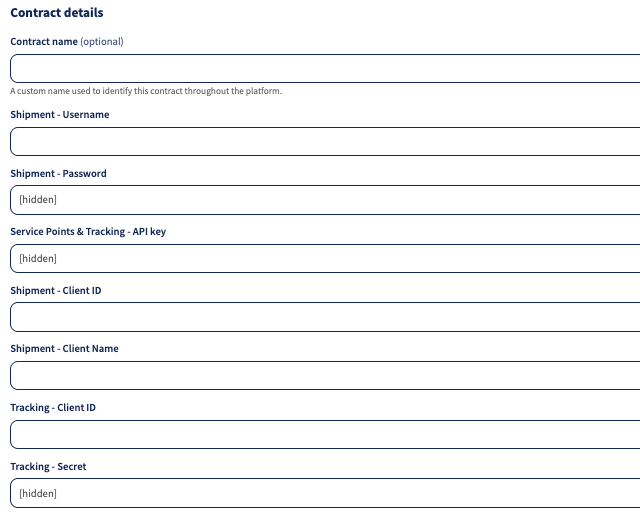
Evri Dropoff account details
- Contract name
- Shipment - Username
- Shipment - Password
- Service Points & Tracking - API key
- Shipment - Client ID
- Shipment - Client name
- Tracking - Client ID
- Tracking - Secret
Tracking page branding
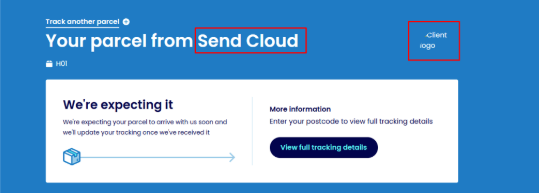
When shipping with Evri through Sendcloud, the branding shown on the tracking page and in Evri notification emails depends on the Evri service used.
Evri (UK)
- In specific cases, custom branding may be available for the Evri tracking page and Evri emails.
- This setup is not enabled by default and requires a manual configuration on the Evri side.
- If enabled for your account, your own brand name and branding can be shown instead of Sendcloud.
Evri Dropoff
- Custom tracking page or email branding is not supported.
- The sender name, subject line, and branding (e.g. “Your parcel from Sendcloud”) cannot be changed.
- This is due to a technical limitation on the carrier side.
If you are shipping with Evri (UK), custom branding may be available in specific cases.
To check whether this is possible for your account, please contact Sendcloud Support.
Done! Once you've followed the steps above, your Evri contract should now be successfully linked to your Sendcloud platform, and you can begin shipping on your Evri rates. When you create a label with a Evri shipping method, the label price will now show as 0.00 EUR in your account.