
Purpose: Follow this guide to enable or disable shipping methods in your Sendcloud panel. This allows you to control which delivery options are available without needing manual adjustments.
Before you start
Before you can enable a shipping method, there are a few things you need to check first.
- Make sure your shipping address and default parcel settings are set up correctly.
- This guide is for users who ship with Sendcloud rates and direct contracts.
Enable a shipping method
You can turn on (or “enable”) specific shipping methods for your account. This lets you offer those delivery options when creating labels.
Here’s how to do it:
- In your Sendcloud panel, go to Shipping → Shipping Prices.
- Fill in the shipment details you want to test, such as origin, destination, weight, and dimensions; then click Load prices.
- Sendcloud will show you a list of available shipping methods for that shipment.
- Find the one you want to use and click Enable shipping method:
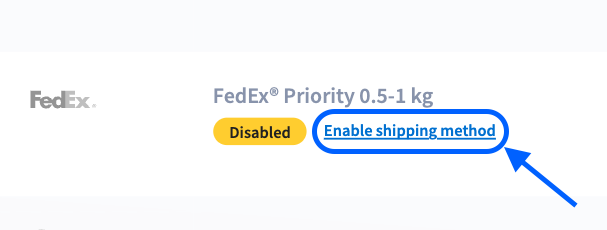
- If you don’t see any change, refresh your page; sometimes it needs a quick reload to appear.
- Once the method is enabled, you can start using it when creating labels.
Want to save time? You can use Shipping rules to automatically select the right method based on weight, destination, or delivery speed.
Good to know: If the carrier isn’t enabled on your account yet, you can manually activate it from this section by clicking “Enable carrier.”:

Disable a shipping method
You can also turn off (or “disable”) shipping methods you no longer want to use.
Here’s how:
- Go to Shipping → Shipping Prices in your Sendcloud panel.
- Enter shipment details (origin, destination, weight, dimensions).
- Click Load prices.
- Find the shipping method you want to disable.
- Click Disable shipping method.
- Refresh the page if you don’t immediately see the change.
Once disabled, the method will no longer be available when creating labels.
If you see “More info”
Sometimes, instead of the “Enable shipping method” or “Disable shipping method” button, you’ll see "More info":
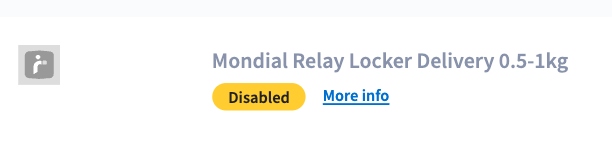
Some methods can only be activated by Sendcloud Support (for example, if the carrier has special conditions or the service is restricted).
In case you see this, please contact our Support team directly so they can help you enable it.
FAQ
Why can’t I see a shipping method in Sendcloud?
Adjust your quote inputs (weight, dimensions, destination, delivery type). Some methods only appear with specific criteria.
The method appears, but I can’t select it for a shipment
- Check the carrier’s shipping conditions (size/weight limits, contents restrictions).
- Make sure your address and pickup location match the method’s availability (for example, domestic vs. international).
- Review any shipping rules that might automatically select another method.