
Purpose: Learn how currency conversion works when shipping from different countries with one Sendcloud account, how exchange rates affect your shipping costs, and where to check the converted amounts.
What is currency conversion?
In short
- You can ship from different countries using one Sendcloud account, even when shipping rates are in different currencies.
- You receive one invoice in one currency, based on the country where you registered your account.
- If you use a Sendcloud shipping rate in another currency, the price is automatically converted when you create the label.
- Cancelled labels are credited at the original amount charged, and surcharges use the original label's exchange rate.
Currency conversion allows you to ship using Sendcloud rates in different currencies while managing your shipments from one Sendcloud account.
This is especially useful if your business has warehouses or sender addresses in multiple countries.
When a shipping rate is priced in a currency different from your invoice currency, Sendcloud automatically converts the cost into your invoice currency.
Example: Shipping from the Netherlands and the UK
Your Sendcloud account is registered in the Netherlands, so your invoice currency is EUR.
You also have a warehouse in the UK and ship parcels domestically within the UK.
UK shipping rates are priced in GBP. Sendcloud converts these costs into EUR, allowing you to manage shipments from both countries using the same account.
You receive one invoice in EUR, even though some shipping rates were originally priced in GBP.
When does currency conversion apply?
Currency conversion applies when you create a shipping label using a Sendcloud shipping rate in a currency different from your invoice currency.
If the shipping rate and your invoice use the same currency, no conversion is needed.
How is your invoice currency determined?
Your invoice currency depends on the country where you registered your Sendcloud account.
You receive and pay your Sendcloud invoices in this currency, even when you ship using rates in other currencies.
What if you use your own carrier contract?
Currency conversion applies to shipping charges billed through Sendcloud rates.
If you use your own carrier contract, your carrier invoices you directly according to your agreement. Sendcloud does not convert these shipping charges.
How are exchange rates calculated?
Sendcloud uses the reference exchange rates published by the European Central Bank (ECB) on working days.
When you create a shipping label, Sendcloud uses the latest available ECB rate, including any applicable currency conversion markup.
The exchange rate is fixed when you create the label.
This means the rate used for that shipment does not change, even if exchange rates increase or decrease afterwards.
If a new rate is unavailable, for example during weekends, public holidays, or a temporary retrieval issue, Sendcloud uses the most recent available rate.
This rate remains applicable for that day, even if a newer rate becomes available later.
Example: Converting GBP to EUR
You create a shipping label costing £4.00.
The applied exchange rate is 1 GBP = 1.15 EUR.
Your converted shipping cost is:
£4.00 × 1.15 = €4.60
You are charged €4.60 in your invoice currency.
This example uses an illustrative exchange rate that already includes any applicable markup.
Why does Sendcloud apply an exchange rate markup?
Exchange rates can change between the day you create a shipping label and the day a cancellation or surcharge is processed.
Sendcloud uses the original label's exchange rate for these adjustments. To cover the risk of exchange rate fluctuations, a small markup is included in the conversion rate.
The current markup percentages are:
- EUR/GBP: 1%
- SEK/DKK: 2%
These percentages may change in the future. The markup applied to your shipment is always the one that was in effect when you created the label.
Where can you see the converted shipping costs?
You can check the converted price when creating a shipping label and when reviewing your invoice.
When creating a shipping label
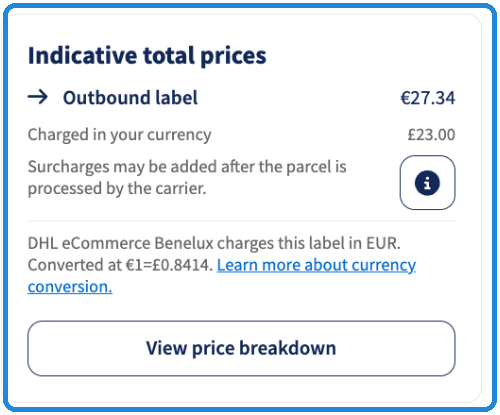
When currency conversion applies, the Summary section shows the original shipping price and the converted amount before you create the label.
Under Indicative total prices, you'll see:
- Outbound label: The shipping price in the carrier's original currency.
- Charged in your currency: The price converted into your invoice currency.
- Exchange rate: The rate used to convert the shipping price.
On your invoice
Even when you ship using different currencies, Sendcloud combines your charges into one invoice in your invoice currency.
To view your invoice:
- In your Sendcloud panel, go to Account > Financial & invoices.
- Select the invoice you want to review.
- Click View details.
- Open the PDF invoice.
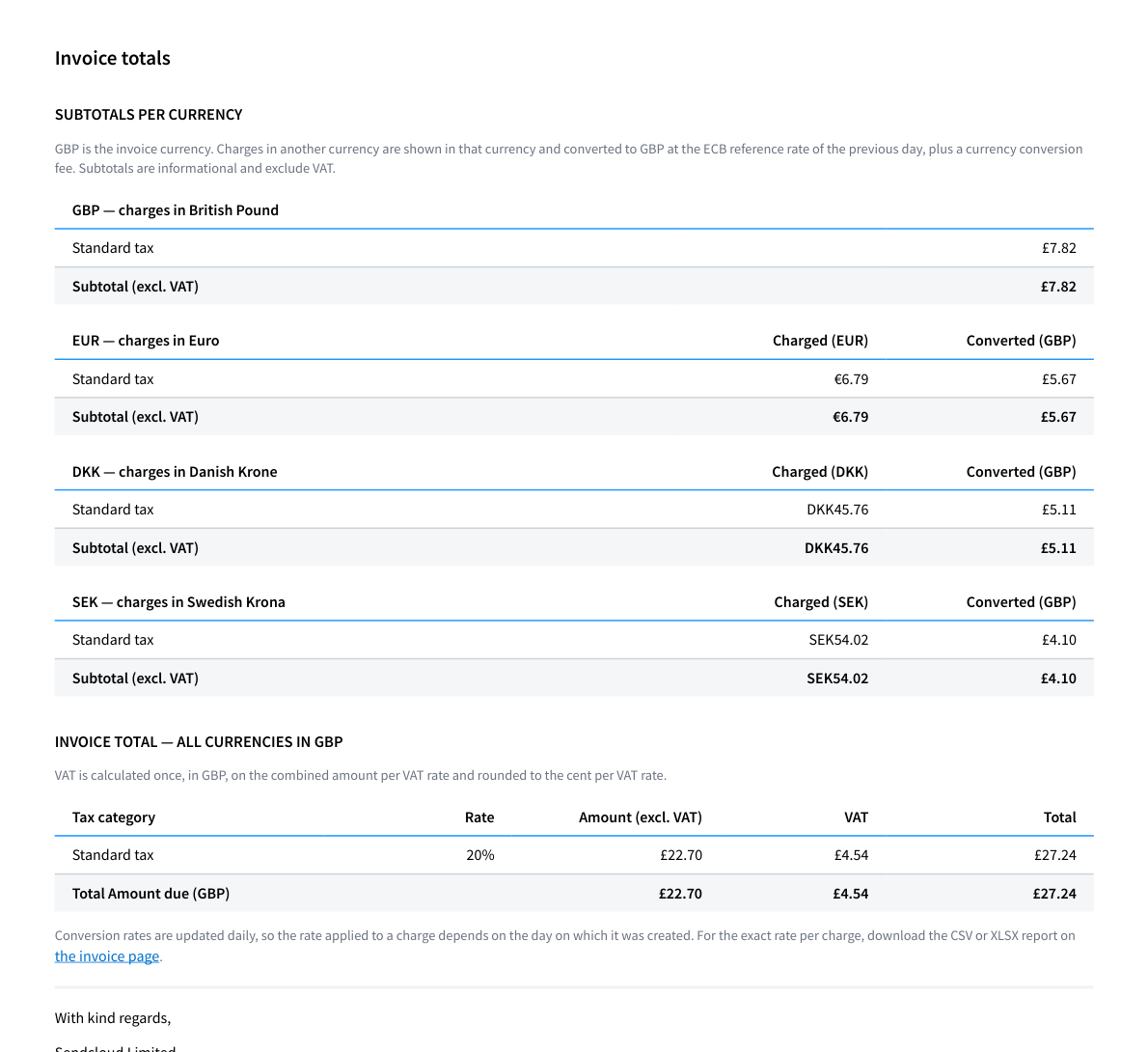
Your PDF invoice includes:
- Shipping charges in the carrier's original currency.
- Subtotals grouped by currency, showing both the original and converted amounts.
- The final invoice total, including VAT, in your invoice currency.
💡 Tip: Need the exact exchange rate?
Download the detailed invoice report in CSV or XLSX format from the invoice page. These files allow you to check the exchange rate applied to individual charges.
For more information about downloading and understanding your invoices, see How to download and read Sendcloud invoices.
What happens if you cancel a shipping label?
If you cancel a converted shipping label, you receive a credit for the exact amount originally charged in your invoice currency.
Even if the exchange rate has changed since you created the label, the credited amount remains the same.
Example: Cancelling a converted label
You create a UK shipping label costing £4.00. The applied exchange rate is 1 GBP = 1.15 EUR, so you are charged €4.60.
Two weeks later, you cancel the label. The exchange rate has increased to 1 GBP = 1.20 EUR.
You still receive a credit of €4.60, not €4.80, because the original exchange rate applies.
How are shipping surcharges converted?
Carriers may add surcharges after your parcel has been shipped, for example if it exceeds the permitted weight or dimensions.
If a surcharge is issued in a different currency from your invoice currency, Sendcloud converts it using the same exchange rate as the original shipping label.
This applies even if the surcharge is added several weeks later.
Example: Converting a surcharge
You create a UK shipping label using an exchange rate of 1 GBP = 1.15 EUR.
Three weeks later, the carrier adds a £1.00 surcharge. The current exchange rate is now 1 GBP = 1.20 EUR.
Sendcloud uses the original rate of 1.15, so you are charged €1.15, not €1.20.
For more information about additional shipping charges, see our Surcharges FAQ and How can I prevent surcharges?.
How can you check historical exchange rates?
You can retrieve the exchange rates used by Sendcloud, including historical rates, through the Sendcloud API.
This is useful if you want to verify the rate applied to a shipment or compare shipping costs with your financial records.
Frequently asked questions
Why don't I receive a separate invoice for each currency?
Sendcloud combines your shipping charges into one invoice in your invoice currency.
This makes payments and bookkeeping easier:
- Payments: Your invoice is paid using one currency. For example, SEPA direct debit only supports EUR payments.
- Bookkeeping: You only need to process one invoice instead of several invoices in different currencies.
- VAT: VAT is calculated and shown in your invoice currency, with totals per tax code.
- Overview: Your PDF invoice still shows charges grouped by their original currencies, so you can see how much you spent in each currency.
Why is the price converted when I create a label instead of when the invoice is issued?
Converting the price when you create a label makes shipping costs more predictable.
- Stable prices: Your shipping cost won't change because of exchange rate fluctuations before invoicing.
- Immediate calculations: Sendcloud can calculate your shipping costs and credit limit usage as soon as you create a label.
- Predictable adjustments: Cancelled labels and surcharges use the original label's exchange rate.